
Send TradingView Alerts to Discord Instantly
TradeTrigger helps you route TradingView alerts straight into your Discord server so your members, team, or private trading community can see signals fast, stay engaged, and react without delay.
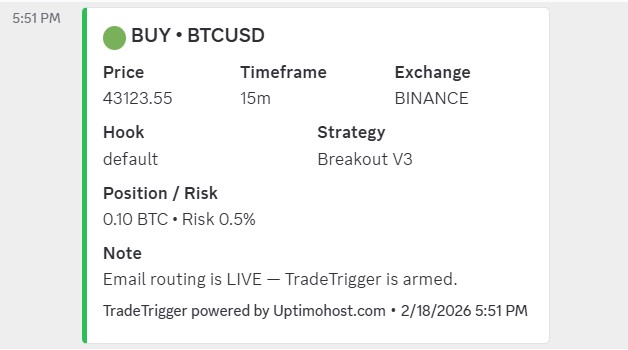
Built for Discord Trading Communities
Whether you run a private signal room, a premium Discord community, or a small team of traders, TradeTrigger helps you get alerts where people are already watching.
Private Trading Servers
Route alerts into a focused server channel so your core group sees setups as they happen.
Paid Communities
Deliver alerts in a more polished way and create a better experience for paying members.
Fast Visibility
Keep your alerts from getting stuck in one platform when your audience is actively using Discord.
Cleaner Workflow
Reduce manual reposting and let TradeTrigger handle the routing for you.
Show People the Signal Where They Already Hang Out
Discord is where a lot of trading communities already talk, share charts, and react to setups. TradeTrigger helps bridge the gap between TradingView and that conversation.
Instead of relying on members to constantly check multiple apps, you can send alerts right into the channels they are already watching.
Stop Losing Momentum Between Alert and Action
Every extra step between a TradingView signal and your Discord community creates friction. That friction costs attention, engagement, and sometimes timing.
TradeTrigger helps simplify the path so the alert reaches your server in a way that feels direct, organized, and reliable.
- No more manual copy/paste from TradingView
- No more scattered alert delivery
- No more making members dig for updates
- No more looking patched together or messy
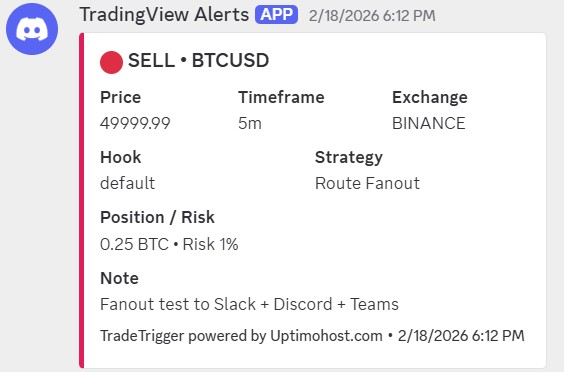
How It Works
The setup is simple, but the result makes your Discord alert flow feel much more professional.
Create Your TradingView Alert
Start with the TradingView alerts you already use for your strategies or indicators.
Connect TradeTrigger
Route that alert into TradeTrigger so it can handle delivery for you.
Send to Discord
Your alerts get pushed into Discord where your members or team can see them immediately.
Who This Is Great For
TradeTrigger for Discord is a strong fit when alerts need to reach people fast in a place they already check constantly.
Signal Sellers
Deliver a better member experience inside your paid Discord server.
Trading Groups
Keep alerts visible for your team without relying on manual reposting.
Community Owners
Look more organized and professional with a cleaner alert pipeline.
Serious Traders
Keep your alert delivery tied into the chat platform you already monitor.
Your Discord Server Deserves Better Alert Delivery
If your members are already in Discord, that is where your TradingView alerts should go. TradeTrigger helps make that happen fast.
Buy TradeTriggerReady to Send TradingView Alerts to Discord?
Give your community a smoother alert experience, cut down on manual work, and route your signals into the place your audience already uses every day.
Start with TradeTrigger